
User`s guide


Voicemail 135
Synapse SB67030/031 Deskset & Accessories User’s Guide Back to Contents
Forwarding a Message
You can forward a message to an extension or extensions, a Voicemail Distribution List
(if enabled), or a Group Mailbox (if enabled). You can also record a message and forward
it to a Distribution List.
“Forwarding a Voicemail Message”
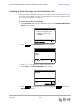
“Recording an Introduction to Send with a Forwarded Message” on page 137.
Forwarding a Voicemail Message
You have several options for forwarding a message, depending on how your system has
been set up.
To forward a Voicemail message:
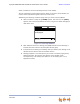
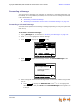
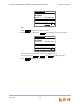
1. Open a Messages list, as described in “Accessing Your Messages” on page 131.
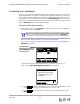
2. Press
or to highlight the desired message.
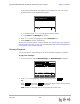
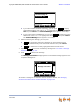
3. Press to display the soft key.
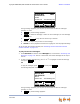
4. Press to begin the forwarding process. The Forward Message screen
appears.
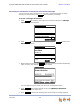
5. Select a target for the forwarded message. Enter an extension number using the dial
pad, or:
Press to display the Extension List. Press or to highlight the
desired extension and press SELECT. The Forward Message screen appears. Go
to Step 6.
More 1/3
FwdMsg
Private 8:05am
Elizabeth Preston Feb 14
Fw dMsg DelAll Mor e 2/3
Press f or next or for previous
message.
Press f or next or for previous
message.
Press f or next or for previous
message.
Messages 1/3
Press f or next or for previous
message.
Quick
Dial
Graham Bell 10:17a
232-555-0176 Feb 23
Private 8:05a
Mary Williams Feb 14
Play A ll
FwdMsg
MB Lis tDis tr Lis tEx t Lis t
Press SELECT when done. Quick
Dial
Enter a target extension:
Forward Message
Or press key below to
select target.
ExtList