
User`s guide

Voicemail 136
Synapse SB67030/031 Deskset & Accessories User’s Guide Back to Contents
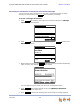
If you have enabled Voicemail Distribution, you can press to display
Voicemail Distribution Lists. Press
or to highlight the desired Distribution
List and press SELECT. The Forward Message screen appears. Go to Step 7.
If your system has Group Mailboxes, you can press to display the Group
Mailbox list. Press
or to highlight the desired Mailbox and press SELECT.
The Forward Message screen appears. Go to Step 7.
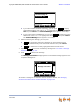
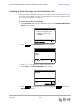
6. Before forwarding the message, you can press:
to add another extension. Messages can be forwarded to three
extensions simultaneously. Enter the desired extension and press SELECT.
to remove the currently highlighted extension from the list.
7. Optional: to record an introductory message. See “To record a message
introduction:” on page 137.
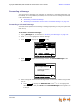
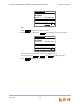
8. Press to forward the message.
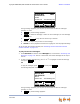
The Message Forwarded message appears. The forwarded message appears in the
recipient’s Messages list.
To forward a message to an extension with the Cordless Handset, see “Managing
Personal Voicemail with the Cordless Handset” on page 149.
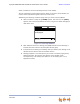
Intr o
Forward Message
Quick
Dial
Forward message to:
AddExt DelExt Intr o
John Smith - 225
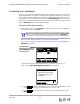
Press
Send
to f orward the message to
llisted extension(s)...
Send
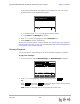
DistrList
MBList
AddExt
DelExt
Intro
Send
Press f or next or f or prev ious
message.
Press f or next or f or prev ious
message.
Press f or next or f or prev ious
message.
Messages 1/3
Graham Bell 10:17am
9-1-800-916-2007 Feb 23
Private 8:05am
Mary Williams Feb 14
Press f or next or f or prev ious
message.
Quick
Dial
Message Forwarded.
Play Mor e 1/ 3DelMsg Call