
User`s guide

Voicemail 137
Synapse SB67030/031 Deskset & Accessories User’s Guide Back to Contents
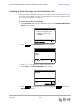
Recording an Introduction to Send with a Forwarded Message
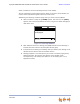
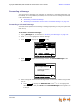
You can record an audio introduction to send with a forwarded message. To begin
recording the introduction, press while forwarding a message.
To record a message introduction:
1. Press after selecting the target for a forwarded message. The Message
Introduction screen appears.
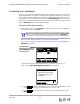
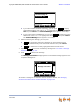
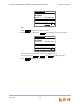
2. Press to begin recording. The soft key changes to and the word
RECORDING appears.
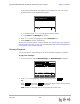
3. When finished recording, press . Reaching the 30-second limit automatically
stops recording. The message review screen appears.
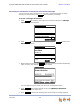
You have options to play, delete, and record the announcement again.
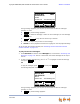
4. Press . The Forward Message screen with [Message Introduction
Attached] appears on the screen.
5. Press to forward the message with the introduction message attached.
Intro
Intro
Press Record to create a short (less
than 30 seconds) introduction.
Press Record to create a short (less
than 30 seconds) introduction.
Press Record to create a short (less
than 30 seconds) introduction.
Quick
Dial
Message Introduction
Forward Message
Rec or d Ex it
Record
Stop
Stop
Press Stop when y ou are f inished
recording
Quick
Dial
Message Introduction
Record Message
Duration: 6s
RECORDING
Stop
Exit
Send