
User`s guide

Voicemail 138
Synapse SB67030/031 Deskset & Accessories User’s Guide Back to Contents
Sending a New Message to a Distribution List
If you have enabled Voicemail Distribution and created at least one Distribution List, you
can record a new message and send it to a Distribution List. To create a Distribution List,
see “Voicemail Distribution” on page 211.
To record and send a new message:
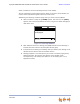
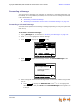
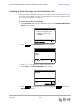
1. Press MESSAGES. With Voicemail Distribution enabled, the Leave New Message or
Listen screen appears.
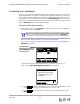
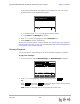
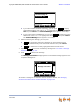
2. Press . The Distribution Lists screen appears.
3. Press
or to highlight the desired Distribution List.
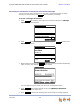
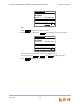
4. Press SELECT. The Record Message screen appears.
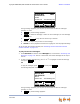
5. Press to begin recording. The soft key changes to and the word
RECORDING appears.
Press Lv Msg to record a new message
or Listen to rev iew y our messages.
ListenLvMsg
Quick
Dial
Do you wish to leave a new
message or listen to your
messages?
Messages
LVMsg
Press or to move highlight, then
press SELECT or Send.
Quick
Dial
Accounts Receivable
Sales
Support
Accounts Payable
Distribution Lists
Press Record to create a message f or
distribution
Quick
Dial
Me ssa ge
Record Message
Rec or d Ex it
Record
Stop