
User`s guide

Deskset Settings 171
Synapse SB67030/031 Deskset & Accessories User’s Guide Back to Contents
Deskset Menu
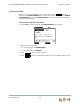
You can use the Deskset menus to set up many Deskset features. Access the Menu by
pressing MENU, and then select options by highlighting an item and pressing SELECT, or
by pressing the dial-pad key with that option number.
To access the Deskset setup menus:
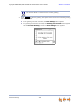
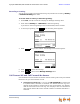
Press MENU. The Deskset Menu appears.
Press 1 on the dial pad to display the Deskset Settings menu. See “Deskset
Settings” on page 172 for further instructions.
Press 2 to display the User Settings menu. See “User Settings” on page 176 for
further instructions.
Press 3 to display the Admin Settings menu. See “Admin Settings” on page 193
for further instructions.
Press 4 to display the Deskset Information menu. See “Deskset Information”
on page 194 for further instructions.
Call Appearance mode only — If your system administrator has set your
extension as an Auto Attendant Manager, the menu has an additional item. Press
5 to change the Auto Attendant settings. See “Auto-Attendant Settings” on
page 196 for further instructions.