
User`s guide

Deskset Settings 173
Synapse SB67030/031 Deskset & Accessories User’s Guide Back to Contents
Display
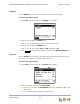
Use the Display menu to adjust your Deskset LCD contrast and backlight.
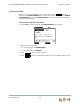
To access the Display menu:
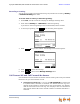
1. Press MENU, then 1, and then 1. The Display menu appears.
2. Press 1 to set the desired Contrast level.
Press
or to adjust the level from 1 to 9. The default is 5.
3. Press 2 to set the desired Backlight level.
Press
or to cycle through Hi, Lo, or Off. The default is Hi.
4. Press to accept the adjustments and return to the Deskset Settings menu.
Sounds
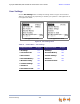
Use the Sounds menu to set the ring volume, delay the beginning of audible ringing,
pick one of nine ringtones, or turn key beeps on and off.
To access the Sounds menu:
1. Press MENU, then 1, and then 2. The Sounds menu appears.
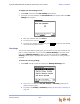
2. Press 1 on the dial pad to choose Ring Volume.
Press or to adjust the Ring Volume from 0 to 9. The default is 3. A ringer
sample plays.
To turn off the ringer, decrease the volume to zero.
Save