
User`s guide

Deskset Settings 179
Synapse SB67030/031 Deskset & Accessories User’s Guide Back to Contents
Recording a Greeting
You can record a greeting up to 60 seconds long. The procedure for recording a Primary
or Alternate Greeting is the same.
To record either a Primary or Alternate greeting:
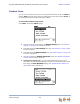
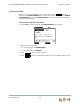
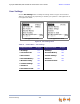
1. Press MENU, then 2, and then 1 to display the Message Greetings menu.
2. Press either 2 (Primary) or 3 (Alternate) to select the greeting.
If you wish to record the greeting on the corded handset, lift the handset.
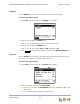
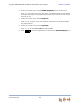
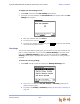
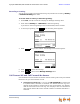
3. To record your greeting, press . The recording screen appears.
4. Press when you are finished. The message review screen appears.
5. Press to review the message.
6. Press to return to the Message Greetings menu.
Call Forward All and Call Forward–No Answer
Call Forward All and Call Forward–No Answer redirect incoming calls. Once your Deskset
forwards a call, you cannot answer the call.
Call Appearance mode only — You can set Call Forward All to redirect calls
to a phone number, extension, or Voicemail. Your Deskset does not ring, but a
message screen appears to confirm that the call was forwarded. Your Deskset
does not record the call in its Call Log. Your company’s caller ID is attached to
calls that Call Foward All sends to outside numbers. The default destination is
Voicemail.
Record
Stop
Play
Exit