
User`s guide

Outgoing Calls 50
Synapse SB67030/031 Deskset & Accessories User’s Guide Back to Contents
Calling a Restricted Number
Your system administrator can configure Call Restriction settings that may prohibit you
from making calls to certain types of numbers — international long-distance numbers,
for example.
Call Restriction settings are specific to each extension in the system. For example, your
extension may have no call restrictions, but other users may be restricted to making only
local calls from their Desksets.
You can always answer and transfer incoming calls from restricted numbers.
To call a restricted number, you must create a User Password on the User Settings menu
or the WebUI. To create a User Password, see “Setting and Changing Your Password” on
page 191 or “Basic Settings” on page 206.
Calling Restricted Numbers on Your Extension
You cannot complete a call to a number that the system administrator restricted for your
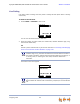
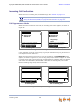
Deskset. If you dial a restricted number and go off hook, a password screen appears. After
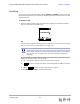
you enter your extension number and password, the Restricted Call screen appears, as
shown in Figure 23.
Figure 23. Restricted Call
You can press CANCEL or hang up to return to the Idle screen immediately.
Call Restriction Settings apply to Call Appearance mode only.
SELECT