
User`s guide

Outgoing Calls 53
Synapse SB67030/031 Deskset & Accessories User’s Guide Back to Contents
Predialing
You can dial a phone number before pressing PHONE or SPEAKER. Pressing a dial-pad
key begins Predial mode. In this mode, the Handset produces no dial tone. You can also
predial from a list.
To Predial a call:
1. Enter the phone number using the dial-pad. (For outside calls, dial 9 or whatever
digit, if any, that must be dialed first).
OR
Access a phone number from any of the lists described in “Accessing and Managing
Items in Lists with the Cordless Handset” on page 110.
Before you call the number, you can press:
The to delete a digit and move the cursor back one space.
to insert a two-second pause. The pause appears as a P in the phone
number.
OFF or to clear all digits. The Idle screen appears.
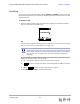
2. Press PHONE or SPEAKER to dial the Predial digits.
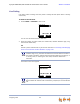
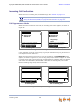
12:30p Feb 23
9-1-706-555-016
Press to backspace
CANCELPAUSE
For outside phone numbers in Voicemail and CID (Call Log) lists, Synapse
dials whatever digit, if any, must be dialed first and then dials the number
in the display. Therefore, numbers that need editing (adding a preceding 1
or a country code, or removing the area code) cannot be dialed from
Voicemail.
PAUSE
CANCEL