
User`s guide

Outgoing Calls 55
Synapse SB67030/031 Deskset & Accessories User’s Guide Back to Contents
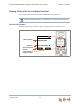
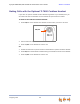
Making Calls with the Optional TL7600 Cordless Headset
If you have an optional TL7600 Cordless Headset registered to your Deskset, then you
can make calls with the Headset. Use the Deskset dial pad to dial the number.
To make a call with the Cordless Headset:
1. Press ON/OFF on the Headset. The Headset is active when you hear a dial tone.
2. Dial the extension or phone number on the Deskset.
3. Press
ON/OFF on the Headset to end the call.
OR
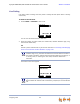
1. Predial the extension or phone number on the Deskset or optional Cordless Handset.
2. Press ON/
OFF on the Headset to initiate dialing and transfer the audio to the Headset.
3. Press
ON/OFF on the Headset to end the call.
ON/OFF