
User`s guide

Overview 22
Synapse SB67030 Deskset and Accessories User’s Guide
Deskset Soft Keys
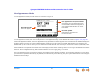
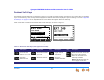
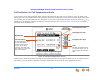
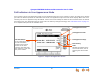
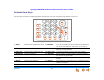
The Deskset provides soft keys as illustrated in Figure 7. The soft key labels change according to the current task. For example,
if you are forwarding a call, the key labels displayed are different from those displayed if you are making a call. See “Appendix
A: Soft Keys” on page 274 for an alphabetical list of the labels that appear above the soft keys.
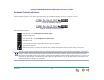
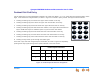
Table 2 and Table 3 describe the Deskset Idle screen soft keys, as shown in Figure 7.
Figure 7. Deskset Idle Screen
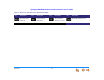
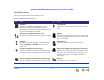
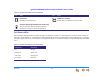
Table 2. Idle Screen Soft Keys (Call Appearance Mode)
Key Description Key Description Key Description Key Description
Turns Do Not
Disturb on or off.
Turns Call Forward
on or off.
Pages internal
extensions.
Moves to the next set of soft
keys. If this key appears,
there are more than four
soft keys available.
More 1/2 indicates that you
are on page one of two.
Accesses
Extension list.
Accesses Park list. Rings the
Cordless Handset.
DNDDNDDND CallFw d Page Mor e 1/ 2
Quick
Dial
12:30PM Thu Feb 25 2010
2 New Missed Calls
5 New Messages
Press or to move highlight, then
press
SELECT
.
EXT 249
John Smith
Call Appearance mode
Line Appearance mode