
User`s guide

Deskset Settings 226
Synapse SB67030 Deskset and Accessories User’s Guide
.
Setting the Cordless Handset to Factory Default
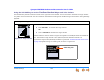
To adjust the incoming voice volume:
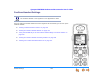
Figure 315. Voice Volume
During an active call or during message playback:
Press VOLUME to increase the incoming voice volume.
OR
Press VOLUME to decrease the incoming voice volume.
A screen similar to the one shown in Figure 315 appears. The example shows the volume set
to 3. There are six volume levels.
If you are using the speakerphone, the speakerphone volume is adjusted.
To reset the Handset to default settings (factory defaults):
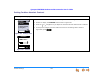
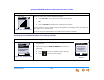
Figure 316. Settings Menu
1. Press OPTIONS, then 5 to display the Settings menu shown
in Figure 316.
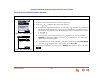
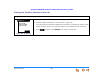
2. Press 3 to display the Restore Default screen shown in
Figure 317.
Press to clear all Handset custom settings.
Press to keep current settings.
12:30p Feb 23
2 Missed Calls
5 New MSGs
EXT 249
John Smith
EXI T
PHONE
12:30p Feb 23
2 Missed Calls
5 New MSGs
EXT 249
John Smith
SETTINGS
1. Display
2. Sounds
3. Restore Default
4. Deregister
EXI T
YES NO
REST ORE DEFAULT
Do you want to
restore default
settings?
Figure 317. Restore
Default