
User`s guide

Call Management 83
Synapse SB67030 Deskset and Accessories User’s Guide
Transferring a Call
To transfer a call to an extension or phone number:
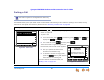
Figure 68. Active Call
Figure 69. Awaiting Transfer
1. Press from the Active Call screen,
as shown in Figure 68. The highlighted call
is put on hold. The Awaiting Transfer
message appears, as shown in Figure 69.
2. Dial a number, as shown in Figure 70, or
access an entry from the Directory, Call Log,
Extension, or Messages list. See “Accessing
Items in Lists” on page 105.
3. Press or SELECT. You can also
retrieve a parked or held call.
You can now speak to the person to whom
you are transferring the call and announce
the transfer, as shown in Figure 71.
4. To complete the transfer, press . A
Call Transferred screen appears for two
seconds. When the transfer is complete, the
screen returns to Idle mode.
The Transfer action can be canceled by
pressing CANCEL. The call remains on hold.
To do this with the Cordless Handset, see
“Transferring” on page 93.
Transfer
Quick
Dial
12:30PM Thu Feb 25 2010
Graham Bell 1-9-232-555-0176 0:01
Transfer Conf Pa r k Mor e 1/ 3
Quick
Dial
12:30PM Thu Feb 23 2008
Transfer Conf Page Mo r e 1/ 3
To retriev e held call, press key
next to icon.
Graham Bell 9-800-95552007 3:00
Quick
Dial
12:30PM Thu Feb 23 2008
Mor e 1/ 3Par kConfTransfer
Graham Bell 9-1-232-555-0176 0:01
Transfer
Quick
Dial
12:30PM Thu Feb 25 2010
Mailbox
Call extension, retriev e a held call, place
outside call, or transf er to Mailbox.
...232-555-0176
Aw aiting Transfer
Ex tL is t
Transfer
Quick
Dial
12:30PM Thu Feb 25 2010
To call, lif t receiv er, or press SPEAKER,
HEADSET, or key next to icon.
Pa us eCallBackspcStore
...232-555-0176 Aw aiting Transfe r
9-1-232-555
Figure 70. Entering the Transfer
Number
Transfer
Quick
Dial
12:30PM Thu Feb 25 2010
...232-555-0176 Aw aiting Transfer
Xfer?
Press
Xfer
?
to conf irm transf er, or
press CANCEL.
9-1-232-555-0154 0:32
Figure 71. Transfer Pending