
User`s guide

Call Management 84
Synapse SB67030 Deskset and Accessories User’s Guide
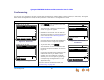
To transfer a call to a Mailbox:
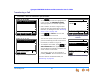
Figure 72. Awaiting Transfer with
Mailbox Option
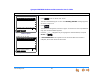
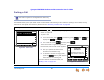
Figure 73. Mailbox List
You can transfer a call to a Personal Mailbox or to a Group Mailbox (if available).
1. Press from the Active Call screen.
The call is automatically put on hold. The Awaiting Transfer message appears,
as shown in Figure 72.
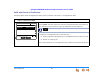
2. Press .
The Mailboxes list appears, as shown in Figure 73. If there are no Group Mailboxes,
only your Personal Mailbox appears.
3. Press the or navigation key to highlight the desired Mailbox, and press
SELECT or .
4. A Call Transferred screen appears for two seconds. When the transfer is
complete, the screen returns to Idle mode.
Transfer
Quick
Dial
12:30PM Thu Feb 25 2010
Mailbox
Call extension, retriev e a held call, place
outside call, or transf er to Mailbox.
...232-555-0176
Aw aiting Transfer
Ex tL is t
Transfer
Quick
Dial
12:30PM Thu Feb 25 2010
Mailbox
Call extension, retriev e a held call, place
outside call, or transf er to Mailbox.
...232-555-0176
Aw aiting Transfer
Ex tL is t