
User`s guide

Call Management 86
Synapse SB67030 Deskset and Accessories User’s Guide
Hold and Cancel a Conference
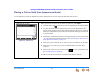
The figures below show Call Appearance mode, but the procedure is the same in Line Appearance mode.
To put a conference on hold:
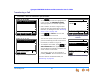
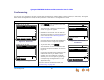
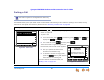
Figure 78. Held Conference
When you are participating in a conference call, you can put both calls on hold by
pressing HOLD. The other callers can continue communicating with each other. The
held conference icon, as shown in Figure 78, designates a held conference.
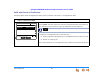
A conference is automatically put on hold when you:
Press an available Call Appearance or Line Appearance key to start a new call.
Answer an incoming call.
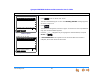
Press a Call Appearance or Line Appearance key to take the conference call off hold.
Transfer
Quick
Dial
12:30PM Thu Feb 25 2010
To retriev e held conf erence, press key
next to either conf erence call.
232-555-0176
Conference Call
350-555-0159 Conference Call
Pa geDrop
is unavailable during an active call if you have another conference on
hold.