
User`s guide

Call Management 88
Synapse SB67030 Deskset and Accessories User’s Guide
Parking a Call
The Deskset allows you to park either active or held outside calls. Parking a call is similar to putting a call on Hold, but any
extension on the system can retrieve a parked call. See “Retrieving a Parked Call” on page 89.
This feature applies to Call Appearance mode only.
To park a call:
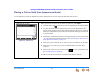
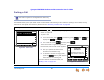
Figure 80. Select Call
1. Press the or navigation key to highlight an active or held outside call, as
shown in Figure 80.
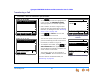
2. To park a call:
For an active call, press . If necessary, press then to
display the soft key.
For a held call, press and then press .
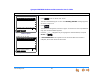
The screen shown in Figure 81 appears for
five seconds, then the Idle screen appears.
Pick up a parked call within three
minutes or the Deskset rings.
To answer a call that is ringing back,
press the soft key that appears
when there is an incoming call.
To do this with the Cordless Handset, see
“Parking a Call” on page 101.
Transfer
Quick
Dial
12:30PM Thu Feb 25 2010
Graham Bell 1-9-232-555-0176 0:01
Transfer Conf Pa r k Mor e 1/ 3
Quick
Dial
12:30PM Thu Feb 23 2008
Transfer Conf Page Mo r e 1/ 3
To retriev e held call, press key
next to icon.
Graham Bell 9-800-95552007 3:00
Quick
Dial
12:30PM Thu Feb 23 2008
Mor e 1/ 3Par kConfTransfer
Graham Bell 9-1-232-555-0176 0:01
DND CallFw d Page Mor e 1/ 2
Quick
Dial
12:30PM Thu Feb 25 2010
Ext 249
John Smith
2 Missed Calls
0 New Messages
Press or to mov e highlight, then
press
SELECT
.
Graham Bell
912325550176
Call Parked on Extension 101.
Press ParkList to retrieve call.
Figure 81. Parked Call