
User guide



7
Getting started
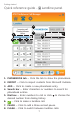
Quick reference guide - Landline panel
PHONEBOOK tab -- Click the tab to show the phonebook.
IMPORT -- Click to import contacts from Microsoft Outlook.
ADD -- Click to create a new phonebook entry.
Search bar -- Enter characters or numbers to search for
phonebook entries.
Dial box -- Enter numbers to call or click to choose the
desired number from dialing history.
-- Click to make a landline call.
PAUSE -- Click to add a three-second pause.
FLASH -- Click to switch between landline calls.
1.
2.
3.
4.
5.
6.
7.
8.
1
2
3
6
5
7 8
4