
User guide



Getting started
4
Skype access authorization
The first time you run Skype after you have installed the AT&T
Softphone Call Manager, Skype may ask for your authorization
to run the softphone program. Click the appropriate button on
the screen to allow the access.
If you have accidentally denied the access, follow the steps below
to allow the access:
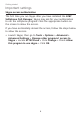
Launch Skype, then go to Tools > Options > Advanced >
Advanced Settings > Manage other programs’ access to
Skype > Locate ATTSCM.exe > Click Change > Check Allow
this program to use skype > Click OK.
•
Important settings