
User guide



5
1/2
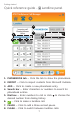
Quick reference guide - Call Connectivity panel
Getting started
Minimize button -- Click the button to minimize the software.
Close button -- Click the button to close the software.
Call status -- Displays the status of Skype/Lync/landline
calls.
Switch between Skype/Lync calls -- Click or to switch
between calls when there are multiple calls.
Battery status -- Displays the battery status of the active
headset when it is placed in the headset base (see page 6).
Current mode -- Displays whether the active headset is in
Phone, PC, or Phone - lifter mode.
1.
2.
3.
4.
5.
6.
3
5
1 2
4
6