
User guide



Getting started
6
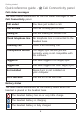
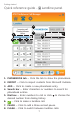
Quick reference guide - Call Connectivity panel
Call status messages
The table below summarizes all the call status messages in the
Call Connectivity panel.
Call ended You have just ended a call.
Call on hold The call is being put on hold.
Calling to You are making an outside call.
Check telephone line No telephone line is connected to the
headset base.
Incoming call There is an incoming call.
Incompatible version The Skype/Lync version you are
currently using is not compatible with
the software.
Logged in You have logged in to Skype/Lync.
Logged out You have logged out from Skype/Lync.
Not installed Skype/Lync is not installed on
your computer.
On a call with You are on a call with XXX.
Battery status
The table below summarizes all the battery status when the
headset is placed in the headset base.
The headset battery has no or very little charge.
The headset battery is charging.
The headset battery is fully charged.