
User's Manual




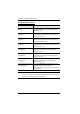
Table Of Contents
- EMC Information
- User Information
- Package Contents
- Contents
- About this Manual
- Conventions
- Product Information
- Chapter 1 Introduction
- Chapter 2 Hardware Setup
- Chapter 3 Basic Operation
- Chapter 4 Hotkey Operation
- Hotkey Port Switching
- Hotkey Setting Mode
- Invoking HSM
- Alternate HSM Invocation Keys
- Alternate Port Switching Keys
- Keyboard Operating Platform
- List Switch Settings
- USB Reset
- Hotkey Beeper Control
- Port Switching Keys
- Firmware Upgrade Mode
- Restore Default Settings
- Keyboard Emulation Control
- Mouse Emulation Control
- Mouse Port Switching
- Monitor Re-detection
- HSM Summary Table
- Chapter 5 Keyboard Emulation
- Chapter 6 The Firmware Upgrade Utility
- Appendix

CS1942DP / CS1944DP User Manual
22
Going Directly to a Port
Note: The n stands for the computer’s Port ID number (1, 2, 3, or 4). See Port
ID Numbering, page 19 for details. Replace the n with the appropriate
Port ID when entering Hotkey combinations.
Hotkey Action
[Scroll Lock] [Scroll Lock] [n]
[Enter]
Brings the KVM, USB hub, and audio focus to the
computer attached to the port corresponding to the
specified Port ID.
[Scroll Lock] [Scroll Lock] [n]
[K] [Enter]
Brings only the KVM focus to the computer attached
to the specified port. The USB hub and audio focus
remain where they are.
[Scroll Lock] [Scroll Lock] [n]
[U] [Enter]
Brings only the USB hub focus to the computer
attached to the specified port. The KVM and audio
focus remain where they are.
[Scroll Lock] [Scroll Lock] [n]
[S] [Enter]
Brings only the audio focus to the computer attached
to the specified port. The KVM and USB hub focus
remain where they are.
[Scroll Lock] [Scroll Lock] [n]
[K] [U] [Enter]
Brings the KVM and USB hub focus to the computer
attached to the specified port. The audio focus
remains where it is.
[Scroll Lock] [Scroll Lock] [n]
[K] [S] [Enter]
Brings the KVM and audio focus to the computer
attached to the specified port. The USB hub focus
remains where it is.
[Scroll Lock] [Scroll Lock] [n]
[U] [S] [Enter]
Brings the USB hub and audio focus to the computer
attached to the specified port. The KVM focus
remains where it is.
[Scroll Lock] [Scroll Lock] [n]
[K] [S] [U] [Enter]
Brings the KVM, USB hub and audio focus to the
computer attached to the specified port.
Note: This is the same action as [Scroll Lock] [Scroll
Lock] [n] [Enter]