
Network Router User Manual

ENGLISH
32
external repeater hub, and have TCP/IP installed and configured to
obtain an IP address through a DHCP server or a fixed IP address
that must be in the same subnet of the I-Fly Wireless ADSL
Router. The default IP address of the I-Fly Wireless ADSL Router
is 192.168.1.254 and subnet mask is 255.255.255.0. The best and
easy way is to configure the PC to get an IP address from the I-Fly
Wireless ADSL Router.
Please follow the steps below for PC’s network environment
installation. First of all, please check your PC’s network
components. The TCP/IP protocol stack and Ethernet network
adapter must be installed. If not, please refer to MS Windows
relative manuals.
Before you configure this I-Fly Wireless ADSL Router, you need
to know the following default settings:
•
Password:admin
• Userneme:atlantis
• IP address (192.168.1.254), Subnet Mask (255.255.255.0)
•
DHCP Server enable
• SSSID= wlan-ap, Channel=6, WEP=disable
1.6 IE Configuration
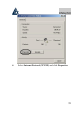
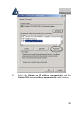
Now open IE, go to Instruments menu, select the Connections
tab and select one of the following options:
• Never use remote connection
•
Use remote connection if another network connection
isn’t available