
Network Router User Manual

Chapter 1 Introduction
5
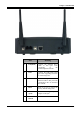
Port Meaning
1 Line(RJ11) Connect the supplied RJ-11
cable to this port when
connecting to the
ADSL/telephone network.
2 USB Connect the USB cable to this
port when Upgrading Firmware
or connecting to PC
3 LAN
Connect a straight or crossover
Ethernet cable to this port when
connecting to PCs or Switch in
the network
4 Reset Press it (10 sec) to restore the
factory default setting back
5 POWER
(jack)
Connect the supplied power
adapter to this jack
6 POWER
Switch
Switch On/Off the device