
Network Router User Manual

Chapter 3 Installation and Configuration
29
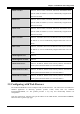
PPPoE VC-Mux VPI/VCI, Service Name, Username, Password, and Domain Name
System (DNS) IP address (it can be automatically assigned from
ISP or be set fixed).
PPPoE LLC VPI/VCI, Service Name, Username, Password, and Domain Name
System (DNS) IP address (it can be automatically assigned from
ISP or be set fixed).
PPPoE None VPI/VCI, Service Name, Username, Password, and Domain Name
System (DNS) IP address (it can be automatically assigned from
ISP or be set fixed).
PPPoA VC-Mux VPI/VCI, Username, Password, and Domain Name System (DNS)
IP address (it can be automatically assigned from ISP or be set
fixed).
PPPoA LLC VPI/VCI, Username, Password, and Domain Name System (DNS)
IP address (it can be automatically assigned from ISP or be set
fixed).
1483 Bridged IP LLC VPI/VCI
1483 Bridged IP VC-Mux VPI/VCI
1483 Routed IP LLC VPI/VCI, IP address, Subnet mask, Gateway address, and Domain
Name System (DNS) IP address (it is fixed IP address).
1483 Routed IP VC-Mux VPI/VCI, IP address, Subnet mask, Gateway address, and Domain
Name System (DNS) IP address (it is fixed IP address).
Classical IP over ATM VPI/VCI, IP address, Subnet mask, Gateway address, and Domain
Name System (DNS) IP address (it is fixed IP address).
3.5 Configuring with Web Browser
The ADSL Modem/Router can be configured with your Web browser. The web browser is included as a
standard application in following operation systems, UNIX, Linux, Mac OS, Windows
95/98/NT/2000/Me/XP, etc. The product provides a very easy and user-friendly interface for
configuration.
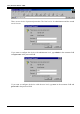
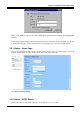
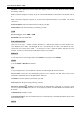
Open the web browser, enter the local port IP address of the ADSL Router, which default at 10.0.0.2 ,
and click “Go” to get the login page.