
Network Router User Manual


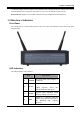
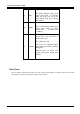

I-Fly Wireless Router ADSL
2
1.2 Package Contents
1. I-Fly Wireless Router ADSL
2. One CD-ROM containing the driver and online manual
3. One Quick Start Guide
4. One RJ-11 ADSL/telephone cable
5. One CAT-5 LAN cable
6. One USB cable
7. One power adapter
1.3 ADSL Modem/Router Features
ADSL Modem/Router provides the following features:
ADSL Multi-Mode Standard: Supports downstream transmission rates of up to 8Mbps and upstream
transmission rates of up to 1024Kbps. It is compliant with Multi-Mode standard (ANSI T1.413, Issue 2;
G.dmt (G.992.1); G.lite (G992.2); G.hs (G994.1)).
Multi-Protocol to Establish A Connection: Supports PPPoA (RFC 2364 - PPP over ATM Adaptation
Layer 5), RFC 1483 encapsulation over ATM (bridged or routed), PPP over Ethernet (RFC 2516) and
IPoA (RFC1577) to establish a connection with ISP. The product also supports VC-based and LLC-based
multiplexing.
Wireless (IEEE802.11b):This is the device for a total freedom of movement without losing the
connection.
Network Address Translation (NAT): Allows multi-users to access outside resource such as Internet
simultaneously with one IP address/one Internet access account. Besides, many application layer gateway
(ALG) are supported such as web browser, ICQ, FTP, Telnet, E-mail, News, Ping and others.
Domain Name System (DNS) relay: Provides an easy way to map the domain name (a friendly name for
user such as www.yahoo.com
) and IP address. When local machine sets its DNS server with this router’s
IP address. Then every DNS conversion request packet from the PC to this router will be forwarded to the
real DNS in outside network. After the router gets the reply, then forwards it back to the PC.
PPP over Ethernet (PPPoE): Provides embedded PPPoE client function to establish a connection. Users
can get greater access speed without changing the operation concept, sharing the same ISP account and
paying for one access account. No PPPoE client software is required for local computer. The Automatic
Reconnect and Disconnect Timeout (Idle Timer) functions are provided, too.
Virtual Server: User can specify some services to be visible from outside users. The router can detect
incoming service request and forward it to the specific local computer to handle it. For example, user can
assign a PC in LAN acting as WEB server inside and expose it to the outside network. Outside user can
browse inside web server directly while it is protected by NAT. A DMZ host setting is also provided to a
local computer exposed to the outside network, Internet.
Bridge Filtering: Filters the packet based on MAC address. It will increase the performance in LAN and
WAN, also provide a higher-level security control.
Dynamic Host Control Protocol (DHCP) client and server: In the WAN site, the DHCP client can get
an IP address from the Internet Server Provider (ISP) automatically. In the LAN site, the DHCP server