
Network Router User Manual



Chapter 1 Introduction
3
can allocate multiple clients IP addresses and distribute them including IP address, subnet mask as well as
DNS IP address to local computers. It provides an easy way to manage the local IP network.
Web based GUI: Supports user-friendly web based GUI for configuration and management.
1.4 Hardware Indicators
Front Panel
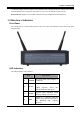
Place the Router in a location that permits an easy view of the LED indicators shown in the front panel
diagram below.
LED Indicators
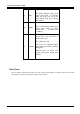
The LED Indicators read as follows:
Port Information
1 POWER
Lit green when power adapter is
connected.
2 WLAN
Check wireless device the
WLAN Indicator flash green.
3 READY
System status indicators when
blinking indicate system is alive.
4 ADSL
When lit, it indicates that the
ADSL (Line) port is connected to
the DSLAM and working
properly.