
WebShare RB300 Wireless N Broadband Router USER GUIDE

WebShare RB300
Pag. 52
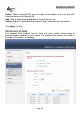
Protocol: Select the protocol TCP or UDP that can be used to access the
application, the “*” is meaning to both of TCP and UDP protocols.
Port Range: Type the port range that can be used to access the
application in the text boxes.
Incoming: Defines which incoming communications users are permitted to
connect with.
Protocol: Select the protocol TCP or UDP that can be used by the
incoming communication, the “*” is meaning to both of TCP and UDP
protocols.
Port: Type the port number that can be used for the incoming
communication.
Add: Click to add the special application profile to the table at the bottom of the
screen.
Update: Click to update information for the special application if user have
selected a list item and have made changes.
Delete: Select a list item and click Delete to remove the item from the list.
Clear: Click to erase all fields and enter new information.