
System information


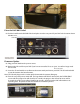


Checking System Information
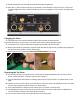
69. Turn the rear panel switch OFF and then ON again. Once the “INITIALIZING” screen appears, tap the
center of the display to enter the information screen shown below.
70. The “Unit ID:” number should match the unit UID label on the rear panel and your DAC. You should
also see a Bootloader version, a Firmware version, a CPLD version, a USB version, and a Bridge version
if your DAC has a bridge card installed. The screen below is an example; some of your values will be
dierent.
Your upgrade is now complete. Happy listening!