
5 Inch Navigation Monitor 5.8 Inch NavigationMonitor with 1 Video Input Capability Operation Manual LCM5N, LCM58N
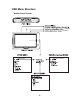
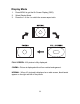

1. Press MENU to get the On Screen Display (OSD).
2. Select Display Mode.
3. Press the + or the - to switch the screen aspect ratio.
Display Mode
FULL SCREEN: 16:9 picture is fully displayed.
CINEMA : Picture is displayed with uniform vertical enlargement.
NORMAL : When 4:3 pictured is displayed on a wide screen, black bands
appear on the right and left of the picture
-9-