
AL329 User Manual V1.00


10
Keyboard Test
The Keyboard Test function verifies if the keys are functioning properly.
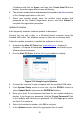
1) Use the SCROLL button to select Keyboard Test from the Tool Self-
test menu, and then press the ENTER/Exit button.
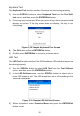
2) Press any key to start test. When you press a key, the key name should
display on screen. If the key name does not display, the key is not
functioning.
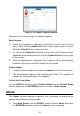
Figure 2-10 Sample Keyboard Test Screen
The OK button refers to ENTER/Exit button.
3) Double press ENTER/Exit to return to previous menu.
LED Test
The LED Test function verifies if the I/M Readiness LED indicator lamps are
functioning properly.
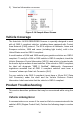
1) Use the SCROLL button to select LED Test from the Tool Self-test
menu, and then press the ENTER/Exit button.
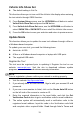
2) In the LED Self-test menu, use the SCROLL button to select one or
more LED lamps to test. The LED should turn on or off according to the
selected commands.
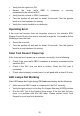
Figure 2-11 Sample LED Self-test Screen
3) When completed, select Previous Menu and press the ENTER/Exit
button to exit.