
AL329 User Manual V1.00


17
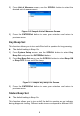
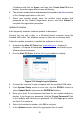
Figure 3-1 Sample System Status Screen
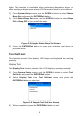
If more than one module is detected, you will be prompted to select
a module to test.
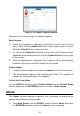
Figure 3-2 Sample Control Module Screen
Use the SCROLL button to select a module and press the
ENTER/Exit button to confirm.
Read Codes
The Read Codes function can be performed with the key on, engine off
(KOEO) or with the key on, engine running (KOER).
Stored Codes are also known as “hard codes”, which are fault codes,
or trouble codes that have been stored in the vehicle computer memory
because the faults have reoccurred for more than a specified amount of
key-cycles. These codes will cause the control module to illuminate the
malfunction indicator light (MIL) when emission-related faults occur.
Pending Codes are also referred to as “maturing codes” or “continuous
monitor codes”. They indicate problems that the control module has
detected during the current or last driving cycle but are not as yet
considered serious. Pending Codes will not cause a malfunction
indicator light (MIL). If the fault does not occur within a certain number
of warm-up cycles, the code clears from memory.
Permanent Codes are DTCs that are "confirmed" and are retained in
the non-volatile memory of the vehicle’s computer until the appropriate