
AL329 User Manual V1.00

18
monitor for each DTC has determined that the malfunction is no longer
present and is not causing the MIL. Permanent DTCs are stored in non-
volatile memory and can not be erased by any diagnostics service or by
disconnecting power to ECU.
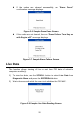
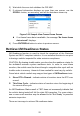
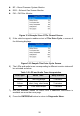
1) Use SCROLL button to select Read Codes from Diagnostic Menu and
press ENTER/Exit button.
Figure 3-3 Sample Diagnostic Menu
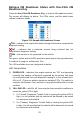
2) Use the SCROLL button to select Stored Codes or Pending Codes
from the Read Codes menu and press the ENTER/Exit button.
If no codes are found, a message will display “No (pending) codes
are stored in the module!” Wait a moment or press any key to
return to previous screen.
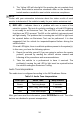
NOTE
Permanent Codes function is available only for vehicles supporting the CAN
protocols.
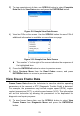
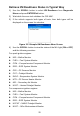
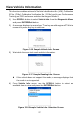
3) View DTCs and their definitions on screen. Press ENTER/Exit button to
return to previous screen.
Figure 3-4 Sample DTC Screen
The control module number, sequence of the DTCs, total number
of codes detected and type of codes (Generic or Manufacturer
specific, Stored or Pending codes) will be observed on the upper
right hand corner of the display.