
AL329 User Manual V1.00

4
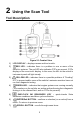
8) OBD II CONNECTOR – connects the scan tool to the vehicle’s Data
Link Connector (DLC).
9) USB PORT – connects the scan tool to the Mac or Windows PC for
upgrading.
Specifications
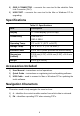
Table 2-1 Specifications
Item
Description
Display
TFT color display (220x176 dpi)
Connectivity
USB mini 2.0
OBD II DB16
Operating Temp.
0℃ to 60 ℃ (32℉ to 140℉)
Storage Temp.
-20℃ to 70 ℃ (-1℉ to 158℉)
External Power
8.0 to 18.0V power provided via vehicle battery
Dimensions
(LxWxH)
120.9 mm (4.76”) x 68.4 mm (2.69”) x 18.0 mm
(0.71”)
Weight
155.2 g (0.342 lb.)
Accessories Included
1) User Manual – instructions on tool operations.
2) Quick Guide – instructions on registering tool and updating software.
3) USB Cable – used to connect to Mac or Windows PC for updating the
tool’s software.
Navigation Characters
Characters used to help navigate the scan tool are:
1) # – identifies the control module number from which data is retrieved.
2) Pd – identifies a pending DTC when viewing DTCs.