
AL529 User Manual V1.00

9
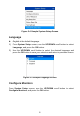
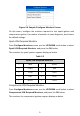
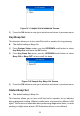
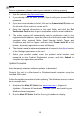
Figure 2-6 Sample Configure Monitors Screen
On this menu, configure the monitors required to test spark ignition and
compression ignition, the number of monitors to pass diagnosis, and restore
the default settings.
Spark IGN Required Monitors
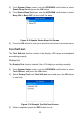
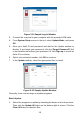
From Configure Monitors screen, use the UP/DOWN scroll button to select
Spark IGN Required Monitors, and press the OK button.
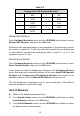
The monitors for spark ignition engines display as below.
Table 2-2
Spark IGN Required Monitors
√
MIS
√
EVAP
√
FUEL
√
AIR
√
CCM
√
O2S
√
CAT
√
HTR
√
HCAT
√
EGR
Compression IGN Required Monitors
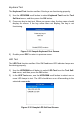
From Configure Monitors screen, use the UP/DOWN scroll button to select
Compression IGN Required Monitors, and press the OK button.
The monitors for compression ignition engines display as below.