
AL529 User Manual V1.00

22
NOTE
The print function is not available on Mac for the present.
1. Download the Maxi PC Suite from www.autel.com and install.
2. Connect the tool to the computer using the supplied USB cable.
3. Run Autel Printer software on the computer.
4. Select Playback on the Main Screen of the tool. On the data menu
screen, select Print Data and then select the data you want to print. Wait
for the review window to display, and then select Print function. The
selected file will upload to your computer.
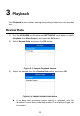
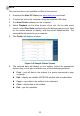
5. The Printer will display as below.
Figure 3-5 Sample Printer Screen
6. The selected data will display on the textbox. Select the appropriate
function key on the right to execute one of the following operations:
Print – print all data in the textbox to a printer connected to your
computer.
Edit – display an editable NOTEPAD window with recorded data.
Copy – copy data in the textbox to the clipboard.
Clear – delete data in the textbox.
Exit – quit the operation.