
AL529 User Manual V1.00


4
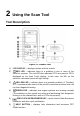
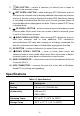
7) ESC BUTTON – cancels a selection (or action) from a menu or
returns to the previous screen.
8) LEFT SCROLL BUTTON – when looking up DTC definitions, press to
view previous character and to display additional information on previous
screens if present; press to deselect all marked PID data when viewing
or recording customized live data list; press to view previous frames of
recorded data when playing back live data. Press to update DTC library
in Update Mode.
9) UP SCROLL BUTTON – press to move up menu and submenu items
in menu mode. When more than one screen of data is retrieved, press
to scroll to the previous screens.
10) RIGHT SCROLL BUTTON – when viewing DTC definitions, press to
view next character and to view additional DTC information;
selects/deselects PID data when viewing or recording customized live
data list, and views next frames of data when playing back live data.
11) OK BUTTON – confirms a selection (or action) from a menu.
12) DOWN SCROLL BUTTON – press to move down menu and
submenu items in menu mode. When more than one screen of data is
retrieved, press to move down to information on next screen.
13) OBD II CONNECTOR – connects the scan tool to the vehicle’s Data Link
Connector (DLC).
14) USB CONNECTOR – connects the scan tool to the Mac or Windows-
based PC for printing and upgrading.
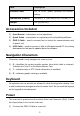
Specifications
Table 2-1 Specifications
Item
Description
Display
2.8-inch LCD (320x240 dpi)
Connectivity
USB mini 2.0
OBD II DB15
Operating Temp.
0℃ to 60 ℃ (32℉ to 140℉)
Storage Temp.
-20℃ to 70 ℃ (-1℉ to 158℉)