
User Manual V2.0

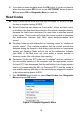
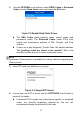
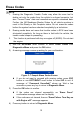
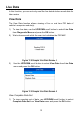
Table Of Contents
- Safety Information
- Safety Messages
- Safety Instructions
- 1 Using This Manual
- 2 Using the Scan Tool
- 3 OBD II Diagnostics
- 4 ABS
- 5 SRS
- 6 DTC Lookup
- 7 Playback Data
- 8 System Setup
- 9 Compliance Information
- 10 Warranty and Service

11
2) Use the UP/DOWN scroll button to select OBDII Codes or Enhanced
Codes from the Read Codes menu and press the OK button.
Figure 3- 5 Sample Read Codes Screen
The OBD Codes reads pending codes, stored codes, and
permanent codes. The Enhanced Codes reads DTCs from
engine and transmission systems of GM, Chrysler, and Ford
vehicles.
If there is not any Diagnostic Trouble Code, the display indicates
“No (pending) codes are stored in the module!” Wait a few
seconds or press any key to return to previous screen.
NOTE
Permanent Codes function is available for merely vehicles supporting the
CAN protocols.
3) View DTCs and their definitions on screen.
Figure 3- 6 Sample DTC Screen
4) If more than one DTC is found, use the LEFT/RIGHT scroll button to
check all the codes.
If retrieved DTCs contain any manufacturer specific or enhanced
codes, the AutoVIN technology adopted by this tool will
automatically display the definition of the code.