
User Manual V2.0

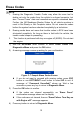
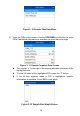
Table Of Contents
- Safety Information
- Safety Messages
- Safety Instructions
- 1 Using This Manual
- 2 Using the Scan Tool
- 3 OBD II Diagnostics
- 4 ABS
- 5 SRS
- 6 DTC Lookup
- 7 Playback Data
- 8 System Setup
- 9 Compliance Information
- 10 Warranty and Service

12
Erase Codes
NOTE
1. Erasing the Diagnostic Trouble Codes may allow the scan tool to
delete not only the codes from the vehicle’s on-board computer, but
also “Freeze Frame” data and manufacturer specific enhanced data.
Further, the I/M Readiness Monitor Status for all vehicle monitors is
reset to Not Ready or Not Complete status. Do not erase the codes
before the system has been checked completely by a technician.
2. Erasing codes does not mean that trouble codes in ECU have been
eliminated completely. As long as there is fault with the vehicle, the
trouble codes keeps on presenting.
3. This function is performed with key on engine off (KOEO). Do not start
the engine.
1) Use the UP/DOWN scroll buttons to select Erase Codes from
Diagnostics Menu and press the OK button.
2) A warning message comes up asking for your confirmation.
Figure 3- 7 Sample Erase Codes Screen
If you do not want to proceed with erasing codes, press ESC
button or use LEFT/RIGHT scroll button to select NO to exit. A
message of “Command Cancelled!” shows up. Wait a few
seconds or press any key to return to Diagnostic Menu.
3) Press the OK button to confirm.
If the codes are cleared successfully, an “Erase Done!”
confirmation message shows on the display.
If the codes are not cleared, then an “Erase Failure. Turn Key on
with Engine off!” message appears.
4) Press any button to return to Diagnostic Menu.