
User Manual V2.0

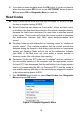
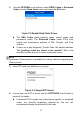
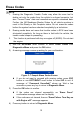
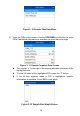
Table Of Contents
- Safety Information
- Safety Messages
- Safety Instructions
- 1 Using This Manual
- 2 Using the Scan Tool
- 3 OBD II Diagnostics
- 4 ABS
- 5 SRS
- 6 DTC Lookup
- 7 Playback Data
- 8 System Setup
- 9 Compliance Information
- 10 Warranty and Service

14
Figure 3- 10 Sample View Data Menu
2) View live PIDs on the screen. Use the UP/DOWN scroll button for more
PIDs if additional information is available on more than one page.
Figure 3- 11 Sample Complete Data Screen
The number “x” to the right of the screen indicates sequence of the
highlighted item.
To view full name of the highlighted PID, press the “?” button.
If the G icon appears when a PID is highlighted, graphic
information is available. Press OK to view graph.
Figure 3- 12 Sample Data Graph Screen