
User Manual V2.0
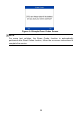




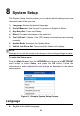
Table Of Contents
- Safety Information
- Safety Messages
- Safety Instructions
- 1 Using This Manual
- 2 Using the Scan Tool
- 3 OBD II Diagnostics
- 4 ABS
- 5 SRS
- 6 DTC Lookup
- 7 Playback Data
- 8 System Setup
- 9 Compliance Information
- 10 Warranty and Service

44
8 System Setup
The System Setup functions allow you to adjust default settings and view
information about the scan tool.
1) Language: Selects the desired language.
2) Unit of Measure: Sets the unit of measure to English or Metric.
3) Key Beep Set: Turns on/off beep.
4) About: Provides information of the scan tool.
5) Tool Self-test: Checks if the LCD display and keyboard are working
normally.
6) Update Mode: Accesses the Update Mode.
7) Vehicle Info Show Set: Turns on/off the Vehicle Info display.
NOTE
Settings of the unit will remain until change to the existing settings is made.
To enter the Setup menu
From the Main Screen: Use the UP/DOWN scroll button and LEFT/RIGHT
scroll button to select Setup, and press the OK button. Follow the
instructions to make adjustments and settings as described in the above
setup options.
Figure 8- 1 Sample System Setup Screen
Language
English is the default language.