
User Manual V2.0
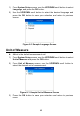

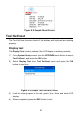
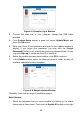
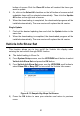

Table Of Contents
- Safety Information
- Safety Messages
- Safety Instructions
- 1 Using This Manual
- 2 Using the Scan Tool
- 3 OBD II Diagnostics
- 4 ABS
- 5 SRS
- 6 DTC Lookup
- 7 Playback Data
- 8 System Setup
- 9 Compliance Information
- 10 Warranty and Service

45
1) From System Setup screen, use the UP/DOWN scroll button to select
Language, and press the OK button.
2) Use the UP/DOWN scroll button to select the desired language and
press the OK button to save your selection and return to previous
screen.
Figure 8- 2 Sample Language Screen
Unit of Measure
Metric is the default measurement unit.
1) From System Setup screen, use the UP/DOWN scroll button to select
Unit of Measure and press the OK button.
2) From Unit of Measure screen, use the UP/DOWN scroll button to
select the desired unit of measurement.
Figure 8- 3 Sample Unit of Measure Screen
3) Press the OK button to save your selection and return to previous
menu.