
User Manual V2.0
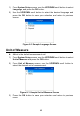

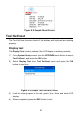
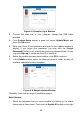
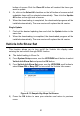

Table Of Contents
- Safety Information
- Safety Messages
- Safety Instructions
- 1 Using This Manual
- 2 Using the Scan Tool
- 3 OBD II Diagnostics
- 4 ABS
- 5 SRS
- 6 DTC Lookup
- 7 Playback Data
- 8 System Setup
- 9 Compliance Information
- 10 Warranty and Service

47
Figure 8- 5 Sample About Screen
Tool Self-test
The Tool Self-test function checks if the display and keyboard are working
properly.
Display test
The Display Test function checks if the LCD display is working normally.
1) From System Setup screen, use the UP/DOWN scroll button to select
Tool Self-test, and press the OK button.
2) Select Display Test from Tool Self-test menu and press the OK
button to start test.
Figure 8- 6 Sample Tool Self-test Screen
3) Look for missing spots in the red, green, blue, black and white LCD
display.
4) When completed, press the ESC button to exit.