
User Manual V2.0

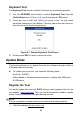

Table Of Contents
- Safety Information
- Safety Messages
- Safety Instructions
- 1 Using This Manual
- 2 Using the Scan Tool
- 3 OBD II Diagnostics
- 4 ABS
- 5 SRS
- 6 DTC Lookup
- 7 Playback Data
- 8 System Setup
- 9 Compliance Information
- 10 Warranty and Service

48
Keyboard Test
The Keyboard Test function verifies if the keys are functioning properly.
1) Use the UP/DOWN scroll button to select Keyboard Test from the
Tool Self-test menu (Figure 8- 6), and then press the OK button.
2) Press any key to start test. When you press a key, the key name
should be observed on the display. If the key name does not show up,
then the key is not functioning properly.
Figure 8- 7 Sample Keyboard Test Screen
3) Double press ESC to return to previous menu.
Update Mode
This function allows you to update the scan tool software through a Mac or
a Windows-based computer.
To update your scan tool, you need the following items.
AutoLink
AL609P
A Mac-based or Windows-based computer or laptop with USB ports
A USB cable
Register the Tool
You would update the scan tool ONLY after you had registered the tool on
our website: www.autel.com. Then you could download software, update
online, retrieve information and get warranty service.
NOTE
Prior to registration, please confirm your network is working properly.
1. Visit the website http://pro.autel.com.