
User Manual V2.0
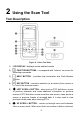
Table Of Contents
- Safety Information
- Safety Messages
- Safety Instructions
- 1 Using This Manual
- 2 Using the Scan Tool
- 3 OBD II Diagnostics
- 4 ABS
- 5 SRS
- 6 DTC Lookup
- 7 Playback Data
- 8 System Setup
- 9 Compliance Information
- 10 Warranty and Service

3
2 Using the Scan Tool
Tool Description
1) LCD DISPLAY –displays menus and test results.
2) FUNCTION BUTTONS – corresponds with “buttons” on screen for
executing commands.
3) HELP BUTTON – provides help information and Code Breaker
function.
4) ESC BUTTON – cancels a selection (or an action) from a menu or
returns to the previous screen.
5) LEFT SCROLL BUTTON – when look up DTC definitions, moves
to previous character and views additional information on previous
screens if DTC definition covers more than one screen; views previous
screen or previous frames of recorded data. It is also used to view
previous trouble code when viewing DTCs.
6) UP SCROLL BUTTON – moves up through menu and submenu
items in menu mode. When more than one screen of data is retrieved,
Figure 2- 1 Scan Tool View