
Specifications




Page 12
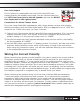
7) Begin by setting the 8” Woofer level using the dial labeled
“LEVEL” on the built in amplier to 12 o’clock. See diagram at
right.
8) Raise the volume level on the preamplier/processor so the
test tone achieves the reference level you documented in Step
3. An assistant will be very helpful for this process because
the meter location and 8” Woofer level adjustment location will
be different. Keep in mind, the intended use of the Strata Mini
loudspeakers are for intimate 2-channel listening so adjust the
8” Woofer level accordingly.
9) Once the 8” Woofer is calibrated to closely match the other
speakers, small adjustments can be made easily using the 8”
Woofer level control in your processor or receiver. If you nd the
need to go much above +2 or +3 consistently, we recommend
adjusting the level control on each Strata Mini amplier upward
instead and using a lower number for reference level on the
processor.
8” Woofer Crossover and Phase Adjustments
After setting up the system reference levels on each Strata Mini, it’s time to set the
crossover (where applicable) and the phase dial (where necessary). This activity will
round out the effectiveness of the 8” Woofer a seamlessly blended part of the four way
Strata Mini system!
Setting 8” Woofer Crossover
The range of low pass crossover adjustment is 30-150Hz and is labeled “FREQ”. If you
do not have a dedicated output for the 8” Woofer such as on a home theater receiver,
simply use the respective left and right line outputs into each Strata Mini line input
for the respective channel. For the crossover setting, it is recommended to begin at
the highest setting (150Hz) and slowly dial it down until it seems as if the bass is
anchored in the front drivers rather than just the 8” Woofer. We strongly recommend
settings around 80Hz-100Hz because this will allow a nice blend with the other Strata
Mini mid and high frequency speakers without making either of them work too hard
with reproducing the bulk of the low frequencies. If you are a traditional 2 channel
enthusiast, this method is the preferred choice. See diagram shown above.
If your preamplier/processor has a dedicated “LFE” or “SUB” output, then you should
leave the crossover set to the maximum setting because the ltering function is handled
upstream in the Dolby Digital/DTS processor. When your processor is not on a Dolby
or DTS source format, it will make the necessary ltering for the LFE output so this
input conguration will yield the best result for that equipment. If you are using Strata
Mini loudspeakers in a home theater system, this is the method you should use. It is
assumed however that most users of Strata Mini loudspeakers will do so in a strictly 2-
channel environment as described in the previous paragraph.
Crossover, Phase, and Level
adjustments on the built-in
amplier with indications for
“Starting Points” before you
ne tune