
Corp. EDID Reader / Writer User's Guide

www.avenview.com
6
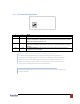
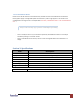
1.8 DIP Switch Configuration
1
2
Mode
OFF
OFF
Reserved mode
OFF
ON
Recording: Connect the monitor to the DVI monitor connector. Once the recording
process is completed, C-EDID-RW has copied the EDID from the monitor into flash
memory the green LED will turn off.
ON
ON
Writing Default: Write the default EDID into C-EDID-RW to replace the existing
EDID in the C-EDID-RW. Once the writing process is completed the green LED will
turn off.
ON
OFF
Connection Mode: Set DIP switches at this position before you connect your
computer to the C-EDID-RW
To avoid initiating undesired errors during switching between modes (e.g.
changing from Recording mode to Connection mode might overwrite the EDID
of display in the C-EDID-RW by default EDID), please unplug the power cord
before you change on of the above modes to another. Plug in the power cord
after you have changed the position of the DIP Switch.
DO NOT plug DVDI cable into PC DVI connector when you are changing from one
mode to another.