
Corp. EDID Reader / Writer User's Guide


www.avenview.com
8
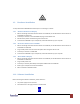
Ensure that power is connected and proper Com Port is selected. Then click on Auto Scan ComPort
1.10.1 Read EDID
- If you would like to read EDID information from the connected monitor, simply click on the button
“Read EDID”. If everything is connected properly, you will see a message “Finish reading the EDID
data from PC to EDID Clone”.
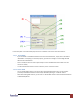
- Click on “Analyze” button to make a quick analysis on the read EDID information which users can
monitor or modify.
- To save the EDID information for future reference, click on “Save File” button.
1.10.2 Write EDID
- You can modify EDID content in the pop-up after clicking Analyze button. Also, you can load the
previously saved EDID information in the analysis window by clicking on “Load File” button
- While finish editing EDID content, you can click on “Write EDID” button to write the EDID information
to EDID Reader/Writer.