
User`s manual


E-23
LAMP/COVER
TEMP
INPUT
ON/STANDBY
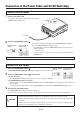
Connection of the Power Cable and On/Off Switching
Switch On the Power
1
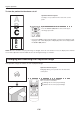
Connectthepowercable
The projector will enter the standby mode and the ON/
STANDBY LED will light in red.
2
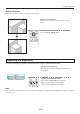
PresstheON/STADNBYbutton( )
Switch Off the Power
1
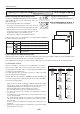
PresstheON/STANDBYbutton( )
"PressON/STADNBYbuttonagaintoturnoff" will appear on the projection screen.
2
PresstheON/STANDBYbutton( )onemoretime.
Thelampwillgooff.
• TheLAMP/COVERLEDashesgreen,thenturnsoffoncecoolingiscompleted.
TheON/STANDBYLEDlightsinresistance.
• Whenthelampisoff,pressingtheON/STANDBYbuttonwhiletheLAMP/COVERLEDisashinggreenwillnotswitchthe
lamp on again.
To switch the lamp on again, please press the ON/STANDBY button again after the ON/STANDBY LED lights in red.
3
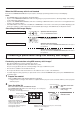
DisconnectingthePowerCable
The ON/STANDBY LED on the operation panel will go off.
Thepowercablecanalsobedisconnected(i.e.,directpowerofffunction)whenthelamp/coverLEDisashinggreen.
Theprojectorisnowabletomakeaprojection.
ON/STANDBY
LAMP/COVER
TEMP
To wall outlet.
Operation with the
Projector
Operation with the
Remote Control
The fan will turn, the lamp will light, and the ON/STANDBY LED will light in
green. The LAMP/COVER LED will light in green.
• IftheLEDlightsinredaftertheON/STADNBYbuttonispressed,projector
trouble is indicated.
→
See Page E-50
• Check that the lens cap has been removed before pressing the ON/
STADNBY button.
Operation with the
Projector
Operation with the
Remote Control
ON/STANDBY
LAMP/COVER
TEMP
CAUTION
• Donotdisconnectthepowercablewhilethelampislit.
• AfterusingtheUSBmemorystick,besuretounplugitandstoreit;donotleaveitinserted.
• Disconnectthepowerplugoftheprojectorfromthepoweroutletwhentheprojectorwillnotbeusedfor
a long time.
• Whenyouwillbereinsertingthepowerplugintothepoweroutletsoonafterdisconnectingit,allowa
xedinterval(ofapproximately10seconds)beforeinsertingit.