
User`s manual


E-28
Regular Operation
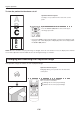
Capturing the Projection Image
/
Still Image Display
When inserting the USB memory stick
Pressing the FREEZE/CAPTURE button will automatically
store the OHP document on the USB memory stick as an
OHP history image.
The projected image will become a still display.
* Pressing the still image/capture button while zoomed
into the OHP document will temporarily display the entire
OHP document on the le list screen; however, while pro-
jecting full screen, the zoom condition at the time the still
image/capture button is pressed will be stored.
* This function is available for the iP-01UE model only.
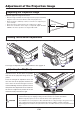
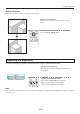
OperationwiththeProjector]
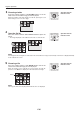
Press the still FREEZE/CAPTURE button.
OperationwiththeRemoteControl
Press the still FREEZE/CAPTURE button.
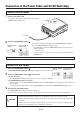
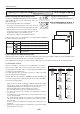
At image capture, the icon is displayed. The icon display differs depending on
the memory capacity currently used.
Icon Memory capacity
USB memory
stick saving
Capture of one history image to below 33% of the memory capacity used
33% to below 66% of the memory capacity used
More than 66% of the memory capacity used
Saving disabled
Valid only when OHP is selected and the USB
memory stick is inserted
ON/STANDBY
LAMP/COVER
TEMP
FREEZE OFF
PORTRAIT
INPUT
FREEZE/CAPTURE
Files saved on the USB memory stick
CapturedimageswillbesavedwithalenameofMMPJxxxx(withxxxxbeingfrom0001to1000)inthefolderXXXAVMPJ(with
XXXbeingbetween100and499)whichislocatedinthe“DCIM”folder.
Up to 1,000 images are stored in one folder, and when 1,000 images are exceeded a new folder will be created automatically.
Toautomaticallysaveale
When you would like to save images to a new folder before the number of
images reaches 1,000, create a folder on the PC with a name to which 1
has been added to the gure XXX of the folder named “XXX AVMPJ” that
currently exists in the USB memory.
The captured images that follow will be saved to the folder in the USB
memory having the largest XXX gure.
Example:Whenthecurrentfolderis“100AVMPJ”,creating“101AVMPJ”will
result in the images being saved automatically to the folder “101AVMPJ”,
whichreectsthelargestgure.
* When the size of a single stored image is 500 KB, approximately 4,000
imagescanbestoredona2GBUSBmemorystick.(Thesizeperim-
agewilldifferdependingontheimagesthathavebeenstored.)
* Our optional USB memory stick is guaranteed to operate.
The other USB memory sticks are not guaranteed to operate.
* For safety sake, please make a backup of the USB memory stick that
you are using.
* The initialization of the USB memory is performed from the menu
screen.(SeepageE-38)
* The aforementioned operation for the purpose of saving les automati-
cally cannot be performed with the projector. Please perform the opera-
tion on the PC.
* Besuretoperformtheinitialization(formatting)oftheUSBmemoryus-
ing FAT 32.
* When there are a large number of recorded images, the speed of saving/
playback may become slower.
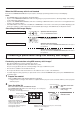
FileStructure
DCIM 100AVMPJ
Folder
MMPJ0001.JPG
101AVMPJ
102AVMPJ
499AVMPJ
MMPJ0002.JPG
MMPJ0003.JPG
MMPJ1000.JPG
Folder Folder
Folder Folder File