
User`s manual


E-29
/
Still Image Display
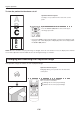
WhentheUSBmemorystickisnotinserted
Each time the FREEZE/CAPTUREbuttonispressed,thecurrentlyprojectedimagewillbefrozen(inaxeddisplay).
NOTE:
• TheFREEZELEDislitgreenduringthestillimagedisplay.
• ApressoftheFREEZE/CAPTUREbuttonwhileamovingimageisprojectedwillresultinastillimagedisplayattheexisting
zoom magnication and position.
• ApressoftheFREEZE/CAPTUREbuttonatthetimeofstillimageofOHPwillresultinareturnofthezoommagnicationand
position to the original condition.
• IftheINPUT button on the main unit or the OHP, PC or VIDEO button on the remote control unit is pressed while displaying a still
picture,thecomputer’sorvideo’sstillpictureiscanceledandtheinputchanges.IntheOHPmode,thestillpicture remains.
Cancelling the Still Image Display
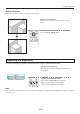
OperationwiththeProjector
PresstheFREEZEOFFbutton.
OperationwiththeRemoteControl
PresstheFREEZEOFFbutton.
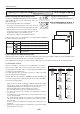
OperationwiththeProjector
AnykeyotherthantheFREEZE/CAPTUREbuttonwillcancel
the operation.
OperationwiththeRemoteControl
AnykeyotherthantheFREEZE/CAPTUREbuttonwillcancel
the operation.
Regular Operation
ON/STANDBY
LAMP/COVER
TEMP
FREEZE/CAPTURE
PORTRAIT
INPUT
FREEZE OFF
AttimeofOHPinput
AttimeofPC/Videoinput
Conducting a presentation using USB memory stick images
History images that have been saved on a USB memory stick are projected with a projector.
Conducting a presentation using USB memory stick images
*
* Our optional USB memory stick is guaranteed to operate.
Operation will not be guaranteed with other USB memory sticks.
The processing speed may become slower depending on the type of USB memory stick.
* This function is available for the iP-01UE model only.
* Do not put a le which is made in other devices to the folder. The act is a cause of the malfunction.
* Ifafolderimagebecomesgraywhenyoupressedtheremotecontrol’sTHUMBNAILbutton,pleasepressFREEZEOFFbut-
ton. And try again.
1
Preparethematerial
Insert a USB memory stick into the projector. Page E-12
• UsingtheiP-01tool,imagesotherthanthosecapturedwiththisprojectorcanbeconverted,andtheycanbeprojected
with this projector.
2
Openthefolderlist
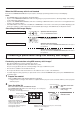
Presstheremotecontrol’sTHUMBNAILbutton.
The FREEZE/CAPTURELEDofthemainunitgoesoninorange(to
indicatethehistorymode).
• 16folderscanbedisplayedatonce.
Operationatthemain
unit
FREEZE/CAPTURE
LED(orange)
Operationwiththe
RemoteControl
Foldercursor(red)
Folderimage(thumbnail)
When there is no title le, the images
of the rst folder will be displayed on
a screen of reduced size.
The image les will be among these.
The image le is put in it.
Folder list display
Numbers are for explanatory purposes and actually,
numbers 1 to 16 are displayed.
F-2 F-3 F-4
F-5 F-6 F-7
F-1
Inside the folder image
displayed, the image saved
with the unit is contained.
ON/STANDBY
LAMP/COVER
TEMP
FREEZE OFF
PORTRAIT
INPUT
FREEZE/CAPTURE